Fast delivery

Launch X431 SmartLink B – Remote Diagnostic Interface for SmartLink Service

780,00 €

The Launch X431 SmartLink B is a remote diagnostic interface designed for use with the Launch SmartLink Service platform. It enables professional technicians to perform remote diagnostics, coding, and programming on vehicles anywhere in the world through a secure internet connection.

Compatible with Launch X431 PRO5, PAD VII, and SmartLink C, this interface supports J2534, DoIP, CAN FD, and RP1210 protocols for seamless communication. The SmartLink B allows remote experts to access, diagnose, and repair vehicles as if they were on-site.

Fast, secure, and efficient — the SmartLink B redefines professional remote vehicle diagnostics for global service connectivity.

Professional diagnostics
EU Ship

Delivery

  • Courier delivery

Our courier will deliver to the address provided.

3-6 Working Days

  • Delivery by DHL courier

DHL courier will deliver to the specified address

3-6 Working Days

  • Warranty 12 months

Description

Launch X431 SmartLink B V2.0 – Advanced Remote Diagnostic and Programming Module

Supports DoIP, CAN FD, J2534, RP1210 | Remote and Local Operation | Compatible with Launch X431 Series

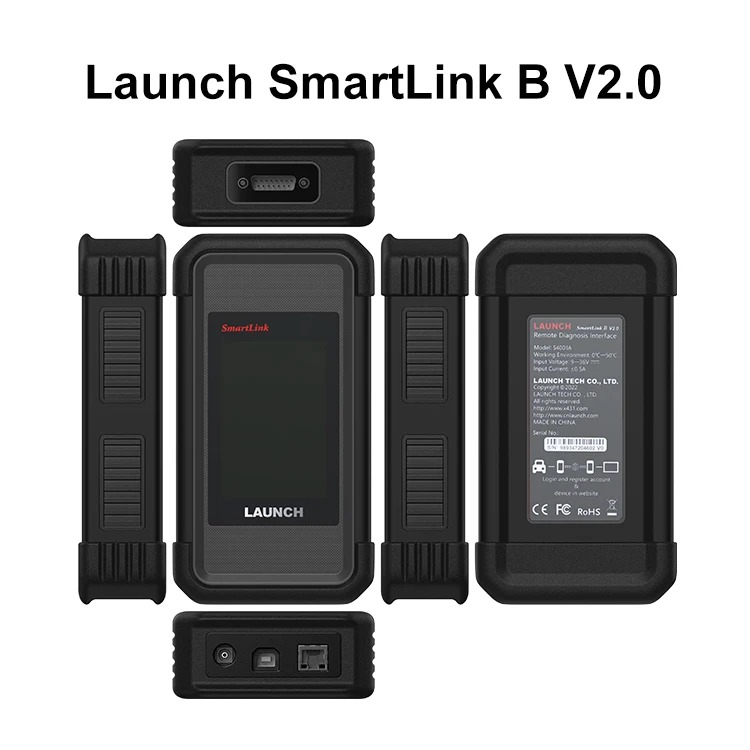
The Launch SmartLink B V2.0 is a cutting-edge communication interface designed to perform remote diagnostics, coding, and ECU programming without physical access to the vehicle.
It forms the core of the Launch SmartLink System, enabling collaboration between workshops and customers worldwide.

Here’s how it works: the client connects a SmartLink C device to the vehicle, while the remote expert operates SmartLink B from anywhere in the world to perform diagnostics, coding, or programming tasks — safely, securely, and in real time.

Launch_X431_SmartLink_B_1
nazajnazaj
naprejnaprej
Launch_X431_SmartLink_B_1
Launch_X431_SmartLink_B_2
Launch_X431_SmartLink_B_3
Launch_X431_SmartLink_B_4
Launch_X431_SmartLink_B_5
Launch_X431_SmartLink_B_6
previous arrow
next arrow
Shadow

🧠 Think of SmartLink B as the master controller in a remote ECU programming setup — the client on-site doesn’t need any technical skills or software. The professional handles everything remotely through the SmartLink platform.

⚙️ Main Features and Advantages

FunctionDescription
🌐 Remote DiagnosticsPerform complete system diagnostics via the internet on vehicles connected through SmartLink C.
🧩 Local DiagnosticsCan also operate locally when connected to Launch X431 tablets.
📡 Advanced Protocol SupportFully supports J2534, DoIP, CAN FD, CAN 2.0, RP1210, and D-PDU standards.
🔁 Live Data & Network StatusDisplays voltage, latency, and connection stability in real time.
🛠️ Universal Tool CompatibilityWorks with Launch software, OEM programs, and third-party diagnostic platforms via J2534 PassThru.
🔒 Secure Client Management“Pre-bind” system ensures each client is locked to a specific technician or workshop for secure communication.

📡 Supported Protocols and Technologies

✅ CAN / CAN FD
✅ DoIP (Diagnostics over IP)
✅ J2534 PassThru (OEM software)
✅ D-PDU / RP1210
✅ Dual-band Wi-Fi (2.4G & 5G)
✅ Ethernet and USB connectivity


🔧 Example Workflow – How SmartLink Operates

1️⃣ The client connects SmartLink C to the vehicle (at home, in a garage, or at the workshop).
2️⃣ The technician logs into smartlink.x431.com and connects remotely to the vehicle.
3️⃣ Diagnostics begin in real time — the expert has full access to modules, data, and control functions.

Supported operations include:

  • Reading and clearing DTCs

  • ECU coding and adaptation

  • Online programming and firmware updates

  • Calibration, relearn, and reset procedures

  • Component activation and live data monitoring


📲 SmartLink Service Platform – Connection and Control Modes

Mode 1 – Technician-Controlled Operation

  • SmartLink C is registered under the technician’s account.

  • The client only connects the hardware to the vehicle.

  • The technician remotely manages all operations, activations, and licensing.

Mode 2 – Client-Controlled Operation

  • The client creates their own SmartLink account.

  • They can post diagnostic requests or manage their own licenses.

  • Optionally, they can be permanently linked (pre-bound) to a specific service provider.


📦 Package Contents

ComponentDescription
🧠 SmartLink B ModuleMain VCI unit featuring a 3.97” color touchscreen display.
🔌 OBD II Extension CableFor connection flexibility during local diagnostics or bench testing.
🌐 CAT-6 Ethernet CableHigh-speed wired connection for reliable communication.
📎 USB CableEnables J2534 PassThru mode for OEM software.
📄 User Manual & Quick Start GuideStep-by-step setup and registration instructions.

🔐 Note: The remote diagnostic license is not included. An annual activation card is required to unlock SmartLink remote services.


📐 Technical Specifications

ParameterSpecification
Display3.97" Touchscreen (320×480)
Operating VoltageDC 9V–36V
ConnectivityDual-band Wi-Fi 2.4G / 5G, Ethernet
USB InterfaceType-B USB 2.0
Memory / Storage256MB / 8GB
Operating Temperature–10°C to +50°C
Power Consumption<6W
Dimensions204 × 110 × 45 mm
Weight3.8 kg

🎯 Ideal Users

🚘 Workshops offering remote diagnostic assistance to other garages or clients
🛠️ ECU coding and programming specialists using OEM or Launch software
💻 Mobile technicians and franchise networks managing multiple service points
🔧 Fleet operators needing remote ECU analysis and troubleshooting support


💡 Why Choose Launch SmartLink B V2.0?

  • Expands your diagnostic capabilities globally

  • Enables advanced remote ECU programming and coding

  • Works seamlessly with Launch X431 PRO5, PAD VII, and PRO3 APEX

  • Supports all modern communication protocols (DoIP, CAN FD, J2534, RP1210)

  • Designed for professional technicians and diagnostic engineers

  • Secure cloud platform with encrypted communication and data protection

Frequently Asked Questions (FAQ)

Yes. SmartLink B supports CAN FD, making it suitable for communication with compatible newer vehicles that use this higher-speed CAN architecture.


Yes. J2534 is one of the supported communication standards, allowing SmartLink B to operate as a Pass-Thru interface in compatible applications. A data cable is included for connecting the unit to a PC when it is being used as a J2534 Pass-Thru device.


Yes. SmartLink B supports J2534 Pass-Thru operation, allowing it to work with compatible OEM diagnostic/programming software. The required OEM software, manufacturer account, subscription, authorization, or programming files are generally separate and depend on the vehicle manufacturer.


Yes. SmartLink B is not limited exclusively to Launch diagnostic tablets. Launch states that it can work with Launch diagnostic tools, OE diagnostic equipment, and compatible third-party diagnostic tools, making it particularly useful for professional remote diagnostic service providers.


Yes. For a normal remote SmartLink session, the vehicle side requires a compatible SmartLink C device. SmartLink C connects to the vehicle’s diagnostic port, while SmartLink B is used by the remote service provider performing the diagnosis.


SmartLink B is designed for the remote diagnostic service provider, while SmartLink C is installed on the customer/workshop side and connected to the vehicle. SmartLink C collects vehicle communication data and sends it through the SmartLink platform, while the remote technician uses SmartLink B with a compatible diagnostic tool to perform the diagnostic session.


It is an advanced communication interface that enables remote vehicle diagnostics, programming, and ECU coding via the internet when paired with a SmartLink C device.


Can it be used locally without internet access?

Yes. SmartLink B can operate locally with compatible Launch X431 tablets for standard diagnostics.


Which communication protocols does it support?

It supports J2534, DoIP, CAN FD, CAN 2.0, RP1210, and D-PDU standards.


Is it compatible with OEM diagnostic software?

Yes. It functions as a J2534 Pass-Thru device, allowing use with OE programs like BMW ISTA, Mercedes Xentry, VW ODIS, and more.


Do I need a separate license to use remote functions?

Yes. A valid annual SmartLink remote license is required to activate cloud-based operations.


Which Launch devices are compatible?

SmartLink B works with Launch X431 PRO5, PAD VII, PRO3 APEX, PRO ELITE, and other modern X431 tablets.


SmartLink C connects to the vehicle, while SmartLink B is used by the remote technician to perform diagnostics and programming.


Does it support DoIP and CAN FD protocols?

Yes. Full support is included for DoIP and CAN FD, ensuring compatibility with new-generation vehicles.


Is data transfer secure?

Yes. All communication between SmartLink B and SmartLink C is encrypted to maintain security and data integrity.


Can it perform ECU programming?

Yes. It supports online ECU programming and coding for compatible vehicle brands and modules.


How do I manage customers or linked devices?

The SmartLink portal allows full account control, including client management, binding, and connection tracking.


Can multiple technicians use the same device?

Yes, as long as they operate under the same Launch account or shared license.


Does it require regular software updates?

Yes. Launch provides frequent OTA (Over-The-Air) updates to ensure compatibility and improve performance.


What warranty does Launch provide?

The SmartLink B V2.0 comes with a 2-year warranty and lifetime technical support.