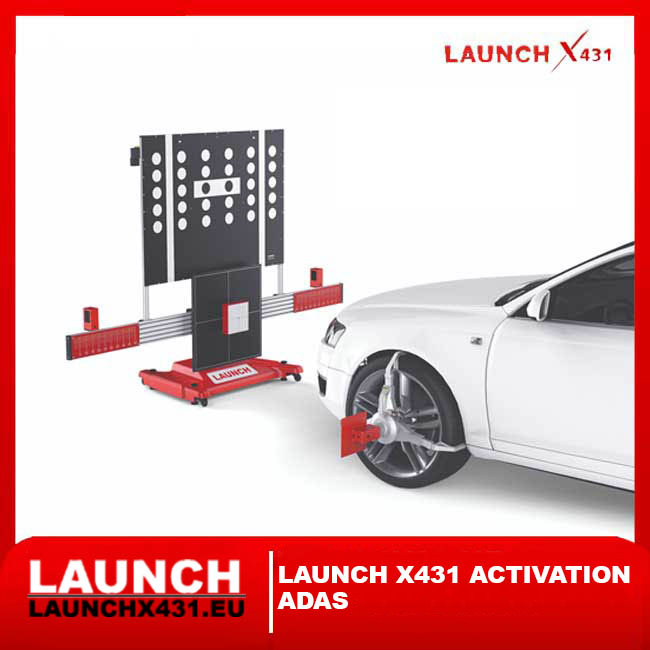


Official Launch X431 ADAS Calibration Software Activation – Request Activation for Your Compatible Launch Diagnostic Device
Unlock ADAS calibration software functionality on a compatible Launch X431 diagnostic device.
This product is intended for workshops and technicians who already have a compatible Launch X431 diagnostic scanner and ADAS calibration equipment and need the appropriate Launch software activation to access supported ADAS calibration functions.
The activation is device-specific. Before activation can be processed, we must verify your Launch diagnostic device using its serial number.
✅ How It Works
The activation process is simple.
| Step | What You Need to Do |
|---|---|
| 1️⃣ Enter your email | We use this address for activation-related communication |
| 2️⃣ Enter your device serial number | This is the most important information |
| 3️⃣ Submit your activation request | We receive your device details |
| 4️⃣ We verify your Launch device | Model, region and ADAS compatibility are checked |
| 5️⃣ ADAS activation is processed | The compatible ADAS software licence is assigned to your device |
| 6️⃣ Update / synchronise your Launch tablet | The activated ADAS functions become available on the supported device |
🎯 What Is the Launch X431 ADAS Activation?
Der Launch X431 ADAS Activation Card / Calibration Software Application is a software activation designed to enable supported Advanced Driver Assistance System (ADAS) calibration functions on compatible Launch X431 diagnostic platforms.
Modern vehicles can contain cameras, radar sensors and other driver-assistance components used by systems such as:
✅ Adaptive Cruise Control
✅ Lane Departure Warning
✅ Lane Keeping Assistance
✅ Forward Collision Warning
✅ Automatic Emergency Braking
✅ Blind Spot Detection
✅ Surround View / Camera Systems
✅ Traffic Sign Recognition
✅ Rear Radar Systems
✅ Parking Assistance
✅ Other manufacturer-specific ADAS systems
When these components are replaced, removed, adjusted or affected by vehicle repairs, calibration may be required.
The Launch ADAS software works together with a compatible Launch diagnostic scanner and suitable ADAS calibration equipment to perform supported calibration procedures.
📩 Important – Serial Number Required
Launch software activations are device-specific.
For this reason, your Launch X431 device serial number is required before the activation can be processed.
We use the serial number to verify:
✅ Exact Launch scanner model
✅ Hardware generation
✅ Regional version
✅ Current software configuration
✅ ADAS software compatibility
✅ Available ADAS activation
✅ Correct licence for your device
⚠️ Important
Two Launch diagnostic scanners can have similar product names but use different hardware, regional software or licence configurations.
Do not purchase an activation based only on the scanner name.
The serial number allows us to verify that the correct ADAS software activation is used for your device.
🔍 What Is ADAS?
ADAS stands for Advanced Driver Assistance Systems.
These systems use electronic sensors and control units to assist the driver and improve vehicle safety.
Depending on the vehicle, an ADAS system may use:
➤ Front-facing cameras
➤ Radar sensors
➤ Rear radar
➤ Side radar
➤ Ultrasonic sensors
➤ Multi-function cameras
➤ Surround-view cameras
➤ Steering-angle information
➤ Ride-height information
➤ Vehicle speed information
➤ Other vehicle sensors and control modules
For these systems to operate correctly, the vehicle must know the precise position and orientation of the relevant sensors.
That is why ADAS calibration may be necessary after certain repairs or adjustments.
🔧 When Can ADAS Calibration Be Required?
Depending on the manufacturer and vehicle, calibration may be required after:
✅ Windshield replacement
✅ Front camera replacement
✅ Radar sensor replacement
✅ Radar removal and installation
✅ Camera removal and installation
✅ Front bumper replacement
✅ Front-end collision repair
✅ Suspension repairs
✅ Wheel alignment
✅ Ride-height changes
✅ Steering-related repairs
✅ ADAS control-unit replacement
✅ Vehicle body repairs
✅ Sensor mounting-position changes
✅ Manufacturer-specified service procedures
⚠️ Always Follow Manufacturer Procedures
The exact calibration requirements depend on the vehicle manufacturer, model, system and repair procedure.
Always follow the vehicle manufacturer's service information and calibration specifications.
📡 Camera Calibration
Many modern vehicles use a forward-facing camera mounted around the windshield or rear-view mirror area.
Depending on the vehicle, this camera may support:
✅ Lane Departure Warning
✅ Lane Keeping Assist
✅ Traffic Sign Recognition
✅ Forward Collision Warning
✅ Automatic Emergency Braking
✅ Adaptive lighting functions
✅ Other camera-based assistance systems
After windshield or camera-related work, the camera may require recalibration.
The Launch X431 ADAS software can guide supported Launch diagnostic platforms through compatible calibration procedures when used with the required calibration equipment.
📶 Radar Calibration
Radar sensors are commonly used for functions such as:
✅ Adaptive Cruise Control
✅ Forward Collision Warning
✅ Automatic Emergency Braking
✅ Blind Spot Monitoring
✅ Rear Cross-Traffic Alert
✅ Lane-change assistance
✅ Other radar-based safety functions
Calibration may be required when a radar sensor has been:
➤ Replaced
➤ Removed
➤ Reinstalled
➤ Repositioned
➤ Affected by collision damage
➤ Affected by bumper or body repairs
The exact procedure depends on the vehicle manufacturer.
↔️ Static and Dynamic ADAS Calibration
Depending on the vehicle, ADAS calibration can be static, dynamic or a combination of both.
| Calibration Type | General Description |
|---|---|
| Static Calibration | Vehicle is positioned relative to targets, panels, reflectors or calibration equipment |
| Dynamic Calibration | Calibration is performed while driving according to manufacturer-defined conditions |
| Combined Calibration | Vehicle may require both static and dynamic procedures |
The Launch diagnostic software determines the supported procedure according to the selected vehicle and system.
⚠️ Important
Software activation alone does not replace the physical equipment required for static calibration.
🛠️ What Do You Need for ADAS Calibration?
ADAS calibration normally requires more than diagnostic software.
Depending on the vehicle and procedure, you may need:
✅ Compatible Launch X431 diagnostic scanner
✅ Active compatible diagnostic software
✅ Launch X431 ADAS software activation
✅ Compatible ADAS calibration frame/system
✅ Correct calibration target or panel
✅ Radar reflector where required
✅ Wheel alignment / positioning equipment where required
✅ Correct workshop environment
✅ Sufficient floor space
✅ Level working surface
✅ Correct tyre pressures
✅ Correct vehicle loading
✅ Manufacturer-specific measurements and procedures
The required equipment varies according to the vehicle and calibration procedure.
⚠️ ADAS HARDWARE IS NOT INCLUDED
This product is for the software activation/application only.
Unless specifically stated otherwise in the offer, it does not include:
❌ Launch diagnostic tablet
❌ VCI
❌ ADAS calibration frame
❌ Calibration targets
❌ Radar reflectors
❌ Wheel clamps
❌ Laser equipment
❌ Alignment equipment
❌ Calibration mats
❌ Physical ADAS accessories
If you need ADAS calibration hardware as well, please contact us separately.
💻 Compatible Launch X431 Diagnostic Platforms
ADAS activation is available only for supported Launch diagnostic devices and configurations.
Compatibility can depend on:
➤ Scanner model
➤ Hardware generation
➤ Serial number
➤ Region
➤ Diagnostic software package
➤ Current software status
➤ ADAS equipment being used
Examples of professional Launch X431 platforms that may support ADAS applications include selected configurations from the:
✅ X431 PRO series
✅ X431 PRO3 series
✅ X431 PRO5 series
✅ X431 PAD series
✅ X431 PAD V
✅ X431 PAD VII
✅ Other compatible professional Launch X431 platforms
➤ Your Scanner Is Not Listed?
No problem.
Send us the serial number and we will check compatibility manually.
Do not assume compatibility based only on the product name.
📝 What Should You Enter?
1️⃣ Email Address *
Enter the email address where you want to receive information regarding your activation.
2️⃣ Launch Device Serial Number *
Enter the serial number of the Launch X431 diagnostic device on which you want the ADAS software activated.
3️⃣ Additional Information
Optional.
You can include:
➤ Exact Launch scanner model
➤ ADAS calibration system/model you are using
➤ Current software status
➤ Country / region
➤ Any additional information about your configuration
✅ If You Are Not Sure About Compatibility
You do not need to identify the exact licence yourself.
Simply provide:
Email + Launch Serial Number
We will check the device information before processing the activation.
📩 What Happens After You Submit Your Details?
1️⃣ We Receive Your Activation Request
You provide your email address and Launch device serial number.
2️⃣ We Verify the Serial Number
We check the relevant device information, including:
Modell
Hardware version
Region
Software configuration
ADAS compatibility
3️⃣ We Check the Correct ADAS Activation
The appropriate activation must correspond with the supported Launch device.
4️⃣ Activation Is Processed
The ADAS software activation is assigned to the compatible Launch diagnostic device.
5️⃣ Synchronise Your Launch Device
After activation has been processed, the Launch tablet may need to be connected to the internet and the relevant Launch application/software updated or synchronised.
6️⃣ ADAS Software Becomes Available
Once correctly activated and synchronised, the supported ADAS calibration application can be used with the appropriate calibration equipment.
🔄 After Activation
After we confirm that the activation has been processed:
Connect your Launch diagnostic tablet to a stable internet connection.
Open the Launch diagnostic application.
Log in to the account associated with the diagnostic device.
Check the available software/download/update section.
Download or update the relevant ADAS software if required.
Restart or synchronise the application if requested.
Confirm that the ADAS calibration menu is available.
The exact menu names and steps can vary according to the Launch device and software version.
🚘 What Vehicles Can Be Supported?
ADAS coverage depends on the Launch software version, diagnostic platform, vehicle manufacturer, model, model year and installed ADAS system.
Potential coverage can include vehicles from many major manufacturers across:
🇪🇺 European vehicles
🇩🇪 German vehicles
🇫🇷 French vehicles
🇮🇹 Italian vehicles
🇬🇧 British vehicles
🇯🇵 Japanese vehicles
🇰🇷 Korean vehicles
🇺🇸 American vehicles
🇨🇳 Chinese vehicles
🌍 Other supported markets
⚠️ Coverage Is Vehicle-Specific
ADAS activation does not mean that every calibration function is available for every vehicle.
Coverage must always be checked for the specific:
Make + Model + Year + ADAS System + Calibration Procedure
🧠 Diagnostic Software vs ADAS Calibration Software
These are related but different functions.
| Funktion | Standard Diagnostic Software | ADAS Software / Equipment |
|---|---|---|
| Read fault codes | ✅ | — |
| Clear fault codes | ✅ | — |
| Live data | ✅ | — |
| Active tests | ✅ Where supported | — |
| Service functions | ✅ Where supported | — |
| Identify ADAS ECU | ✅ Where supported | — |
| ADAS calibration procedure | Device dependent | ✅ Where supported |
| Physical target positioning | ❌ | Requires ADAS equipment |
| Camera target calibration | ❌ Hardware not included | ✅ With correct equipment |
| Radar reflector calibration | ❌ Hardware not included | ✅ With correct equipment |
ADAS software activation therefore does not replace your normal diagnostic software and does not replace the physical ADAS calibration system.
🎯 Calibration Targets & Panels
Static calibration procedures can require manufacturer-specific targets or panels.
Depending on the vehicle, these may include:
➤ Camera calibration targets
➤ Pattern boards
➤ Radar reflectors
➤ Calibration panels
➤ Floor mats
➤ Positioning accessories
➤ Manufacturer-specific target configurations
Using an incorrect target or incorrect positioning can result in an unsuccessful or incorrect calibration.
Always use the target specified for the exact vehicle and procedure.
📐 Correct Positioning Is Essential
ADAS calibration is a precision procedure.
Depending on the manufacturer, the calibration equipment may need to be positioned according to:
Vehicle centre line
Wheel centre line
Thrust angle
Distance from vehicle
Target height
Target offset
Radar angle
Camera position
Floor level
Vehicle ride height
Even small positioning errors can affect calibration results.
For this reason, the technician should always follow the vehicle manufacturer's calibration specifications and the instructions for the ADAS calibration equipment.
🛡️ Why ADAS Calibration Matters
ADAS systems can influence safety-related vehicle functions.
Incorrect camera or radar alignment may potentially affect how a driver-assistance system detects:
Vehicles
Road markings
Pedestrians
Objects
Traffic signs
Distances
Driving lanes
Surrounding traffic
For professional repair work, correct calibration should therefore be treated as part of the repair process whenever required by the manufacturer.
🔐 Device-Specific Activation
The Launch X431 ADAS software activation is linked to the supported diagnostic device.
This means:
✅ Serial number verification is required
✅ Compatibility is checked before activation
✅ Activation is intended for the submitted device
❌ It is not a universal activation code for every Launch scanner
❌ It should not be assumed transferable between devices
❌ One activation should not be assumed to cover multiple diagnostic tablets
If you have several Launch scanners, provide the serial number of the exact device that will be used for ADAS calibration.
📦 What Is Included?
| Artikel | Enthalten |
|---|---|
| Launch X431 ADAS software activation | ✅ |
| Serial number compatibility check | ✅ |
| Activation processing | ✅ |
| ADAS calibration software access | ✅ For supported device |
| Launch diagnostic tablet | ❌ |
| VCI | ❌ |
| ADAS calibration frame | ❌ |
| Camera targets | ❌ |
| Radar reflectors | ❌ |
| Wheel clamps | ❌ |
| Alignment equipment | ❌ |
| Other physical ADAS hardware | ❌ |
⚠️ Before Purchasing / Activating
Please make sure you understand the following:
1️⃣ A Compatible Launch Scanner Is Required
This software activation is not a standalone diagnostic product.
2️⃣ ADAS Hardware Is Required
For static calibration procedures, compatible physical ADAS calibration equipment is normally required.
3️⃣ Serial Number Verification Is Required
The activation is device-specific.
4️⃣ Vehicle Coverage Varies
Not every ADAS procedure is supported on every vehicle.
5️⃣ Correct Workshop Conditions Are Required
ADAS calibration can require precise distances, positioning, floor conditions and vehicle preparation.
6️⃣ Professional Use Is Recommended
ADAS calibration should be performed by technicians who understand the manufacturer's repair and calibration requirements.
❓ Frequently Asked Questions
➤ Is this a physical activation card?
This listing is for the Launch X431 ADAS software activation/application service. Activation is processed for the compatible Launch device using the required device information.
➤ Do I need to provide my serial number?
Yes.
The serial number is required to identify the device and verify compatibility.
➤ Will this work with every Launch X431 scanner?
No.
Compatibility depends on the exact Launch model, hardware, region and software configuration.
➤ Does this include an ADAS calibration frame?
No.
Physical ADAS calibration equipment is not included unless explicitly stated otherwise.
➤ Does this include calibration targets?
No.
Targets, reflectors and other physical accessories are separate.
➤ Can I use the activation on several Launch scanners?
The activation is device-specific. Do not assume that one activation can be used on multiple scanners.
➤ Can you check my scanner before activation?
Yes.
Send us the serial number of your Launch device so that compatibility can be verified.
➤ Does ADAS activation guarantee every vehicle is supported?
No.
Coverage depends on the vehicle, model year, installed ADAS system, calibration procedure and current Launch software coverage.
➤ Do I still need normal diagnostic software?
Yes.
ADAS calibration software works as part of the compatible Launch diagnostic ecosystem and does not replace the standard vehicle diagnostic software required by the scanner.
✅ Why Choose Launch X431 ADAS Software Activation?
✅ Official Launch X431 ADAS software application
✅ Device-specific activation
✅ Serial number verification
✅ Designed for professional ADAS calibration
✅ Camera calibration support where available
✅ Radar calibration support where available
✅ Static calibration procedures where supported
✅ Dynamic calibration procedures where supported
✅ Broad multi-brand vehicle coverage
✅ Integration with compatible Launch X431 diagnostic platforms
✅ Suitable for professional workshops, body shops, glass specialists and ADAS calibration centres
🏁 Ideal For
This activation is suitable for:
🔧 Professional automotive workshops
🚘 Diagnostic specialists
🎯 ADAS calibration centres
🪟 Automotive glass replacement specialists
🚗 Collision repair centres
🛠️ Body shops
📐 Wheel alignment centres
⚡ Automotive electronics specialists
👨🔧 Independent repair technicians
📩 Activate Launch X431 ADAS Calibration Software
1️⃣ Enter your email address
2️⃣ Enter your Launch X431 device serial number
3️⃣ Submit your activation request
We will use the serial number to verify the exact device and compatible ADAS activation.
✅ Device compatibility is checked
✅ Serial number is required
✅ Correct ADAS activation is processed
✅ Activation is linked to the compatible Launch device
✅ No physical ADAS equipment is included
✅ Vehicle and function coverage depends on the supported Launch software
Turn your compatible Launch X431 diagnostic platform into part of a professional ADAS calibration solution with the correct Launch X431 ADAS software activation.